Artificial Intelligence


How is AI-Native Software Development Lifecycle Disrupting Traditional Software Development?
This viewpoint explores how artificial intelligence is revolutionizing software development by automating coding, enhancing testing accuracy, and accelerating delivery pipelines. It highlights the shift toward AI-native engineering, where developers collaborate with AI to build, test, and deploy software.
Insights
This viewpoint explores the transformative impact of AI on modern software engineering. Key topics include:
- Opportunities Presented by AI
- The AI-Augmented Development Workflow
- AI-Powered Solutions
- Key Influencing Factors
- Risks, Concerns & Mitigation Strategies
- The Future of AI Native Software Development Life Cycle
Introduction
In today’s world demand for high-quality software is ever increasing, which is putting pressure on companies to accelerate their Software Development Lifecycle (SDLC). To stay ahead of the competition and innovate, companies need to improve their time to market and make their development process more efficient.
Software development is undergoing a major transformation. The next-generation development approach integrates cloud-native technologies, AI-driven automation, collaborative tools, and DevSecOps practices. This has empowered development teams to deliver better software solutions more efficiently and innovate effectively.
- Gartner Forecast: According to a Gartner research, 70% of developers will use AI tools by 2027. As per Gartner’s 2025 Emerging Tech Report, 60% of rollouts in Enterprise AI will have Agentic capabilities.
- Developer Statistics: During 2023- 2025, 920% growth in usage was observed by Github for Agentic frameworks like AutoGPT, BabyAGI, Crew AI, and OpenDevin. As per GitHub and Hugging Face, 4.1 million developers have experimented with agentic AI frameworks.
How are Human-Centric processes holding us back?
In human-centric SDLC, there are extensive manual processes involved which tend to be inefficient and slow down development time. These processes are usually repetitive in nature and involve some low-level tasks. Relying solely on human output for tasks like code generation, testing and bug fixing can make the development process time consuming and prone to human errors. Leveraging AI can bring productivity improvements which developers can utilize for higher pursuits. Here is a look at how human centric SDLC is holding us back and how leveraging AI can bring improvements.
Figure 1: Challenges in Human-Centric SDLC and AI Solutions
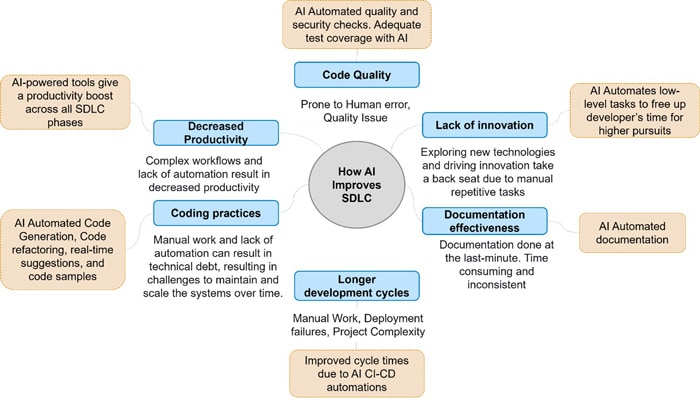
AI-native Software development life cycle is rapidly evolving where AI driven tools are giving improvements in developer productivity, improving code quality, reducing the development time, and bringing innovation and efficiency. Here is a look at AI impact in the software development life cycle.
What does the AI-Augmented Development Workflow look like?
Given below is the impact of AI on the stages of development versus the traditional manual process and the status of AI usage. This needs to be tailored to a specific tech stack or project type.
| Phase | Manual Process | AI Impact | Deliverables | AI applicability | Status of AI usage |
|---|---|---|---|---|---|
| Requirement | Manual elicitation through stakeholder inputs and documentation. | Analyzes historical data and user behavior to suggest initial requirements. | Requirements Specification | Low | AI can assist but requires manual refinement for complex or evolving needs. |
| System Design | Manual creation of architecture and design diagrams. | Assists in generating architectural blueprints and UX designs using templates and suggestions. | Architecture, Design, Prototypes | Low | AI tools are helpful but not yet reliable for detailed or nuanced design decisions. |
| Coding and Implementation | Manual coding by developers. | AI-assisted code generation, suggestions, reviews, and refactoring. | Executable Software, Source Code | Medium | Effectiveness depends on clear prompt formulation and requires manual refinement for tasks that need precision. |
| Testing and debugging | Manual test case writing and bug identification. | Test case generation and bug detection | Test Cases, Bug Reports | Medium | Useful for UI testing; limited in API and complex logic testing. Can give false negative/positives |
| Deployment | Manual deployment using scripts and configuration files. | Streamlined deployments and automated scripts. | Deployed Software | Low | Automation is possible but still requires manual oversight and validation. |
| Maintenance and Monitoring | Manual monitoring and fixing issues | Predictive maintenance using anomaly detection and log analysis. | Updates, Error Reports | Low | AI is emerging in this space but lacks full coverage and reliability. |
| Code Documentation | Manual documentation of code structure, logic, and dependencies. | AI tools generate documentation by analyzing code structures, variables, functions, and dependencies. | Technical Documentation | Medium | Works best with clear prompts and structured processes; needs manual oversight. |
The AI Tooling Landscape
Here is a look at how AI is integrated into different phases. Use cases for distinct phases and AI tooling landscape below:
| Phase | AI Augmentation | Tools |
|---|---|---|
| Analysis |
|
|
| Design |
|
AI Design: Tools best suited for rapid prototyping rather than detailed design refinement
Adobe Firefly – Image generation from natural language prompts with integration to Adobe Creative Cloud |
| Coding |
|
Coding (IDE plug-ins + chat interface)
|
| Testing |
|
AI test automations mostly for UI. Lacks advanced API testing features.
|
| Deployment |
|
|
| Maintenance |
|
|
What are the AI Platforms/ Services in wide use?
Here are some of the AI platforms and services that are widely used. These platforms offer end-to-end tools for building, training, deploying, and managing AI models, with enterprise-grade infrastructure and compliance.
- Amazon Bedrock - Offers access to pre-trained foundation models (Claude, Llama, Titan, etc.) for building generative AI apps via API
- Amazon Sagemaker AI - A full-fledged ML platform for training, tuning, and deploying custom models with deep control over infrastructure and workflows
- Azure Open AI – Offers secure access to GPT-4o, DALL·E, Codex, and other models with enterprise-grade governance
- Azure AI Foundry - A unified platform for building, customizing, and managing AI agents and applications with support for multi-agent orchestration and enterprise compliance
- Google Vertex AI- End-to-end platform for building, training, and deploying models
- Google Gemini - Offers AI tools integrated into Google Cloud and Workspace for NLP, code generation, and productivity improvements
Other platforms like Anthropic Claude, OpenAI, IBM Watsonx, and Cohere offer alternatives without full cloud infrastructure.
- OpenAI Platform (Direct): Provides direct access to GPT-4o, DALL·E, Whisper, and Codex via API, with fine-tuning and embedding support.
- IBM Watsonx: Combines foundation models, governance, and ML lifecycle tools for enterprise AI development focused on responsible AI and compliance.
- Cohere: Multilingual LLMs for retrieval-augmented generation (RAG), embeddings, and classification suited for search, recommendation, and knowledge-based applications.
- Anthropic Claude (via API or Bedrock): Capabilities include long-context reasoning and enterprise-grade NLP with safety and interpretability.
What are the considerations for evaluating models for projects?
Integrating Large Language Models (LLMs) into software development can be highly beneficial, but it requires careful planning and execution. Key Considerations are as follows:
Eco System and Integration
- API Availability: Ease of integration into existing systems like IDEs, version control (Git), CI/CD pipelines, and project management systems
- Tooling and SDKs: Support for development tools (IDE plug-ins) like GitHub Copilot, AWS Q, Google Gemini Code Assist, and Snyk.
- Community and Support: Availability of documentation, forums, and vendor support.
- Implementation
- Type: Various project types including Greenfield, Brownfield, Transformation, Migration, and Steady State Maintenance.
- Language: Support for multiple programming languages such as Java, .Net, Python, JavaScript, and SQL.
- Customization and control
- Whether the underlying model can be chosen or fine-tuned
- Model – LLM / SLM
- Model Size and Family: Consideration of model size and whether it is open-source or proprietary.
- Use Case Fit: Adaptation of the model to specific project domains or data.
- Latency and Throughput: Performance metrics.
- Cost
- Usage Cost: Pricing models for hosted LLMs, including pay-per-token subscription or flat-rate pricing.
- Infrastructure Cost: Costs associated with on-prem LLMs.
- Cost Effectiveness: Evaluation of cost efficiency at scale.
- Privacy, Security, Compliance
- Data Retention: Whether the model retains or logs data.
- Legal Requirements: Compliance with GDPR, HIPAA, and other legal standards
- Can be self-hosted, source code availability
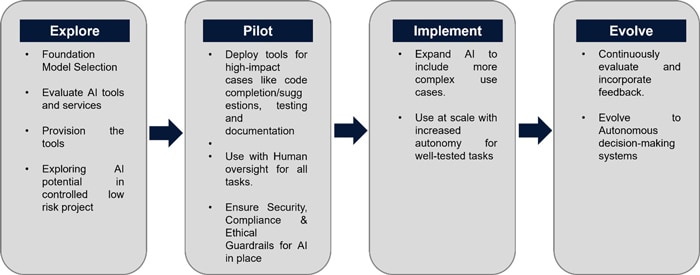
What does the Implementation Plan to integrate AI in SDLC look like?
Here is an outline for a structured plan for integrating AI into Software Development.
What are the Risks, Challenges and Mitigations in AI implementations?
Some challenges faced with AI implementation are given below:
Data Privacy and Security
- Non enterprise LLMs include tradeoffs which will be unacceptable, like prompts and code in future updates to vendor products, potential breach of data privacy, and intellectual property leaks. Proprietary LLMs and tools like Github copilot, AWS Q, Google Codey etc. are suited for enterprise use.
Lack of Deep Understanding
- AI tools have limitations with handling solutions which need Novelty and Complexity and Deep understanding of the architecture, business logic of the project, specific constraints etc.
Accuracy and Reliability
- AI may give superficial suggestions which may not address the true root cause. It may not always produce optimized or error-free suggestions. It may suggest insecure coding practices without understanding the security implications of the code. Understanding large codebases can be challenging. Providing clear detailed and specific prompts, manual review of the output and breaking down large tasks into smaller, manageable pieces. The code needs to undergo code quality and security scans.
- The code suggestions are not consistent.
- False Positives/Negatives: AI testing tools can flag non-issues or miss actual bugs or vulnerabilities, requiring human validation.
Hidden cost of manual reviews
- There is a Dependency on Human Expertise for reviewing the AI code output. Coverage Gaps in AI-generated tests can be addressed by human reviews. AI tests might not provide adequate coverage for complex scenarios or critical edge cases.
Ethical AI Implementation
- Ethical AI relies on some Core Principles to address AI shortcomings:
- Transparency: Open documentation of algorithms used to develop trust.
- Bias Mitigation: Safety mechanisms like filtering training data, RLHF (Human Guided Learning), Guardrails, prompt moderation, output filtering, Ethical frameworks, feedback loops.
- Regulatory Compliance: Global standards Adherence like the GDPR and AI Act.
- Industry Initiatives: Google’s AI Principles, Microsoft’s Responsible AI Framework
Building the Agentic future
Agentic AI are autonomous systems, unlike the Gen AI tools which passively respond to queries and can independently perform multi-step tasks. Agentic AI is capable of:
- Proactively identifying tasks and opportunities
- Planning and executing sequence of actions
- Adapt approaches, learn from experience
- Human Collaboration, collaboration with other AI systems
In SDLC, AI systems can independently perform complex development tasks while being aware of the broader project context. Orchestrator Agent is used to coordinate activities across specialized agents.
- Functions independently, making decisions and pursuing goals while seeking minimal human guidance
- Evaluates situations to determine the optimal path forward
- Develops, implements, and refines workflows to meet specific objectives
Example of Github Copilot Agentic mode:
- Autonomous: Agent mode of GitHub Copilot can perform multistep coding tasks autonomously. It can accept natural language prompts. It can run suggest code edits, run tests, format, and refactor code and execute commands based on a single prompt.
- Contextual understanding: It can understand the full context of the codebase rather than in pieces.
- Performs complex operations like setting up project configurations and integrating libraries.
- Problem solving iterations: An agentic loop is operated to refine its work.
Specialized AI agents embedded in distinct phases of development can achieve improved levels of productivity, quality, and innovation, contributing to a significant paradigm shift in the way software is developed.
Key Takeaways
The future of software development is being transformed by AI-native engineering. AI is gradually transforming SDLC by automating repetitive tasks and enhancing productivity, though its effectiveness varies across phases.
In the requirements and design stages, AI offers low impact, mainly assisting with data analysis and blueprint suggestions, but still requires manual refinement for complex needs. During coding and implementation, AI tools provide medium impact through code generation and suggestions, though precision tasks still need human oversight. Testing and debugging benefit from AI in UI test case generation and bug detection, but limitations exist in API testing and accuracy. Deployment and maintenance see low AI adoption, with automation possible but manual validation still essential. Documentation is moderately supported by AI, which can generate structured outputs but needs clear prompts and review.
Project planning and collaboration is enhanced by AI-powered project management tools. AI tools are transforming the way developers code and ensuring secure software. Not just the code, AI testing tools are reshaping QA to ensure reliable software. AI-driven tools automating dev-ops, reducing system downtime, and improving resource management. AI tools assist in the maintenance of applications as well. Ethical AI is constantly evolving to address Bias mitigation and transparency.
The AI adoption plan follows a phased approach. Explore foundational tools, Pilot AI in low-risk projects, Scale to broader use cases, and Evolve into autonomous systems.
Evolving roles: As developers transition from manual coders to AI orchestrators, their focus will shift toward designing intelligent systems, integrating automation, and upholding ethical and secure software practices.
The emergence of AI-assisted software development approaches like Vibe coding where developers use natural language to guide large language models (LLMs) to create code.
AI as assistant, where AI tools function as assistants to augment developer capabilities, is the most prevalent model in use. AI as collaborator where AI tools engage in dialogue with developers is emerging. AI as an autonomous agent is in the early stages and gaining traction.
It is important to see the future of software development as a human and AI collaboration rather than humans versus AI — with each contributing unique strength that could produce alone.
References
Throughout the preparation of this viewpoint, information and insights were drawn from a range of reputable sources, including research papers, articles, and resources. Some of the key references that informed us of the content of this viewpoint include:
- AI in Software Development | IBM
- GitHub Copilot · Your AI pair programmer · GitHub
- AI and Software Development 2025
- Building the Agentic Future | Microsoft Community Hub
- Agentic DevOps in action: Reimagining every phase of the developer lifecycle - Microsoft for Developers
- BrowserStack AI | BrowserStack
- The Application and Impact of AI in the SDLC
- From Today’s Code to Tomorrow’s Symphony
These references provided the foundation upon which the discussions, insights, and recommendations in this viewpoint were based.



Subscribe
To keep yourself updated on the latest technology and industry trends subscribe to the Infosys Knowledge Institute's publications
Count me in!